For YouTubers and channel owners sitting on videos that deserve more views...
Your Videos Aren't Underperforming. Their Packaging Is. Fix It From Inside YouTube Studio.
Studio Optimizer AI reads the video you have open in YouTube Studio and rewrites the title, description and tags with AI so it gets found and clicked. Then it goes further: chapters, subtitles, thumbnail text, a pinned comment, end screens, playlist SEO, and an honest read of your analytics that tells you which videos are even worth touching. New uploads or your entire back catalogue, one at a time or every open tab at once.
One-time from $12.95 • No subscription • 30-day money-back guarantee
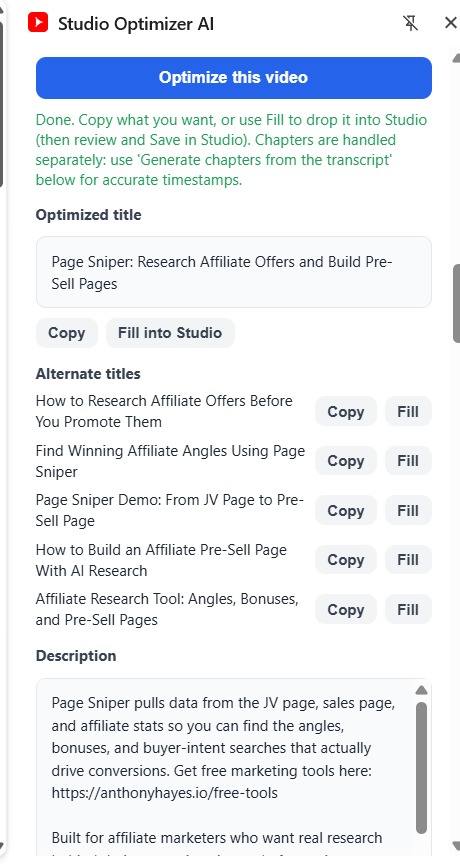
The side panel writes your title, five alternate titles, description and tags. Copy any field, or fill it straight into Studio.
The real problem
The smallest change with the biggest payoff
Most channels are full of videos with flat titles and one-line descriptions that YouTube cannot understand and viewers never click. The video is fine. The packaging is the problem.
You already know the fix: feed the topic to AI, get a sharper title and a real description. Creators who do this see a steady climb in views because the small wins add up across a whole channel. The catch is doing it by hand, video by video, prompt by prompt, tab by tab. That is slow, so it never gets done.
Studio Optimizer AI removes the slow part, and it lives where you already work: inside YouTube Studio.
Start here: the rewriter
Open a video, click Optimize, get clickable metadata
Open a video on its YouTube Studio edit page and click Read this Studio tab. The current title and description load straight into the side panel. Add a topic, an optional keyword, and a tone. Click Optimize, and you get:
A sharper, search-friendly title, kept under YouTube's limit so it is never cut off
5 alternate titles taking different angles, so you pick the hook you like
A full description: a hook in the first lines that actually shows in search, a clear summary, the key points the video covers, a call to action, and relevant hashtags
A set of tags
Then copy any field, or click Fill into Studio to drop the new title or description straight into the editor. You review it and click Save in Studio yourself. Nothing changes without your say-so.
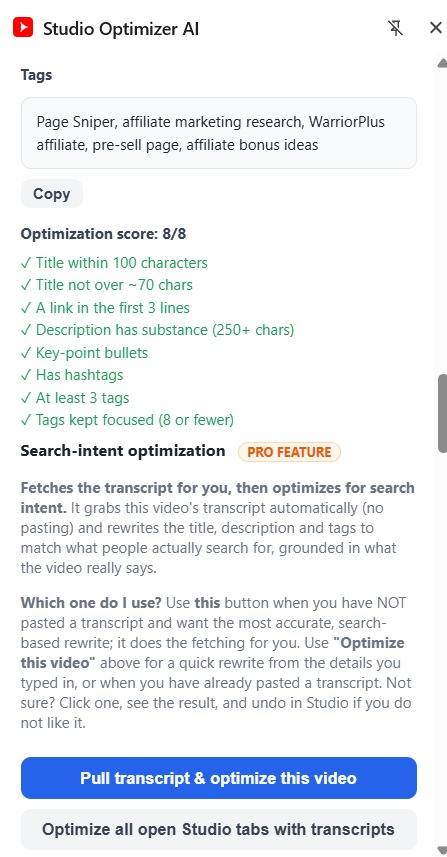
It also scores every result against YouTube SEO best practice (keyword placement, description fold, chapters, tag count and more) and offers a one-click Auto-fix to close the gaps. Set your website, giveaway, socials and CTAs once in Settings and the right link is placed above the fold automatically.
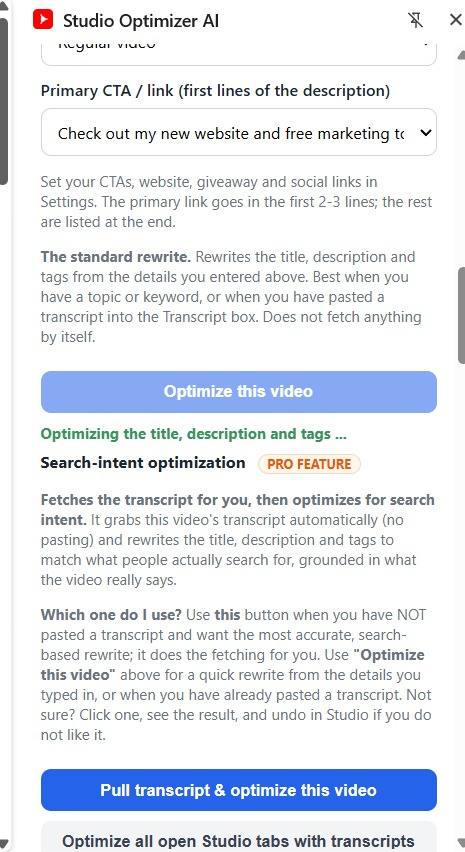
Set your links and CTA once, add a topic, then click Optimize.Every result is scored against YouTube SEO best practice, with one-click Auto-fix.
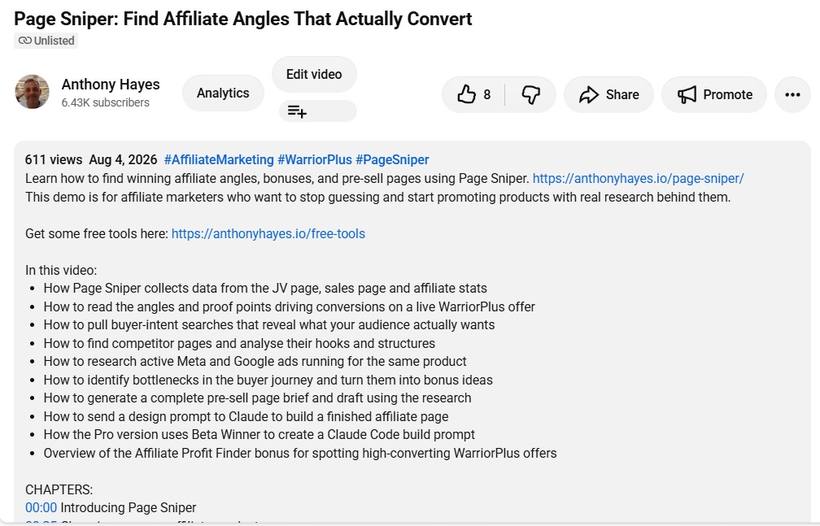
The finished title and description, live on the video.
Your back catalogue
Re-optimize your whole back catalogue
Open several videos on their Studio edit pages in separate tabs, click Optimize all open Studio edit tabs, and Studio Optimizer AI works through every one, giving each its own card with copy and fill buttons. Re-optimize a dozen old videos in the time it used to take to do one.
Optimize every open Studio edit tab at once, then export the lot to a spreadsheet.
Free with Core
And chapters, generated from the transcript
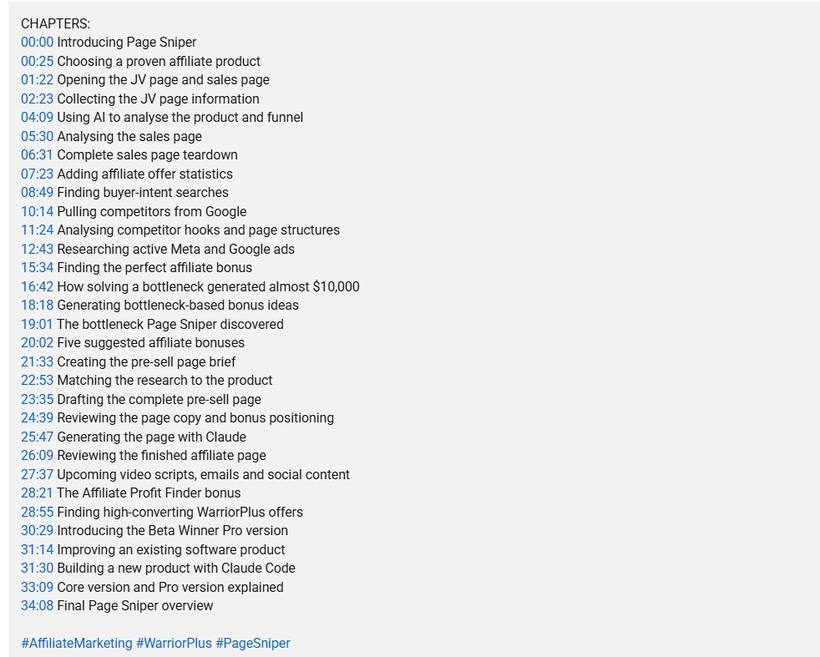
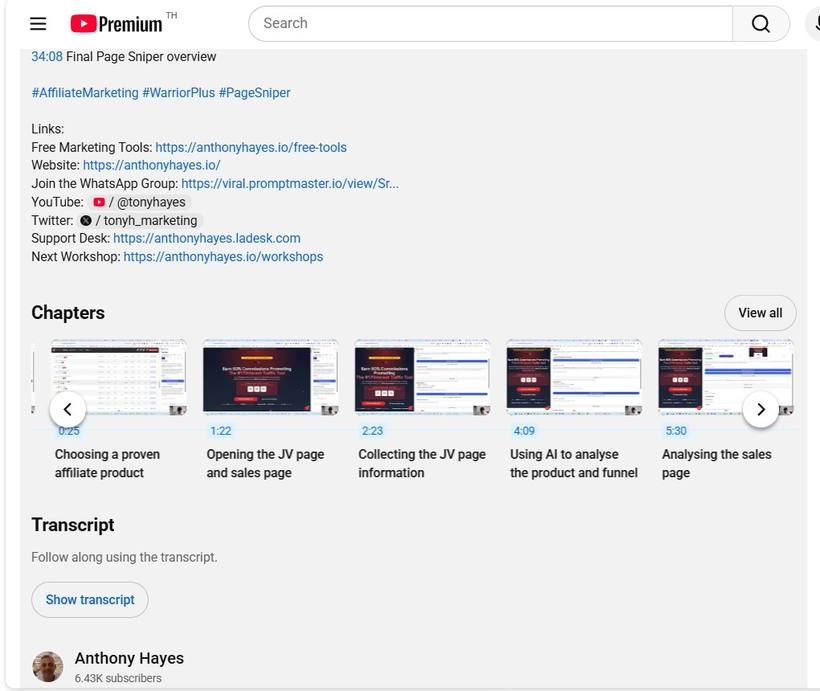
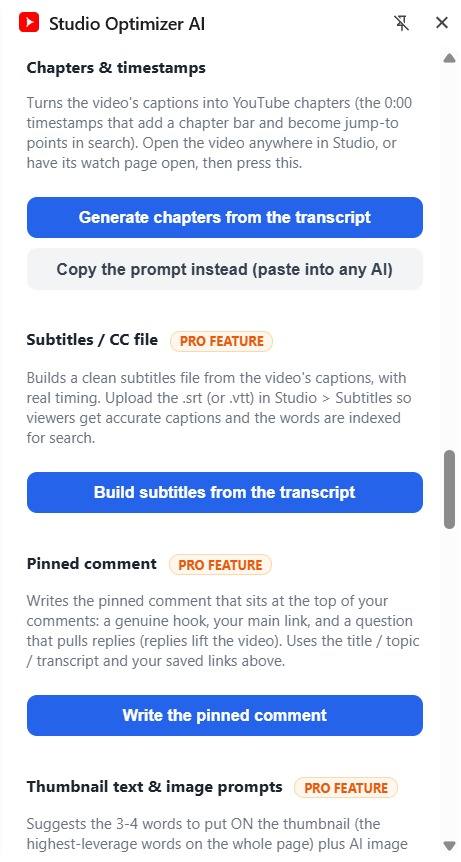
Click Generate chapters from the transcript and it reads the video's captions with their real timings and groups them into proper YouTube chapters (first one at 0:00, at least three), ready to paste into the top of your description. The timestamps are real, never invented. Chapters add a progress bar, jump-to points in search, and a reason to keep watching.
Chapters generated from the transcript, with real timings, ready to paste.How it looks on the live watch page: chapter markers, links and a full transcript.
Watch the pass
From a tab nobody clicks to metadata that earns the click
This is the whole rewrite, in one pass. It reads the dull title and thin description sitting in your Studio tab, then hands back the rewrite for you to review and fill.
One dull tab in. Clickable metadata out. You press Save.
The upgrade
Then Pro turns one tool into a growth toolkit
Everything above is Core. Pro unlocks the rest, all inside the same extension, no second install and no second key.
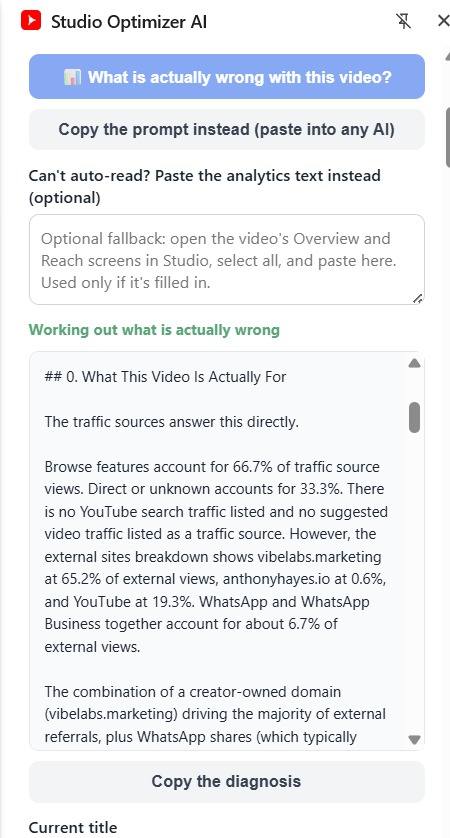
Before you rewrite, Pro reads the analytics and tells you what is actually wrong with the video.
Should you even rewrite this?
Analytics-driven. Before you touch a title, Pro reads the video's Overview and Reach screens in Studio and tells you which problem it actually has: nobody seeing it, people seeing it and not clicking, or people clicking and leaving. If the title is already doing its job, it says so. It even surfaces the real search terms bringing people in. Can't auto-read a screen? Paste the numbers in.
Optimize for search intent
Pull transcript and optimize grabs the video's transcript and rewrites the metadata to match the search intent the video actually satisfies, not just the topic you typed. One video, or every open Studio tab at once.
Subtitles / CC file
Clean captions. Build a clean .srt or .vtt subtitle file from the captions with real timing, and upload it in Studio so viewers get accurate captions and YouTube indexes every word.
Pinned comment writer
Pull replies. Write the pinned comment that sits at the top of your comments: a genuine hook, your main link, and a question that pulls replies.
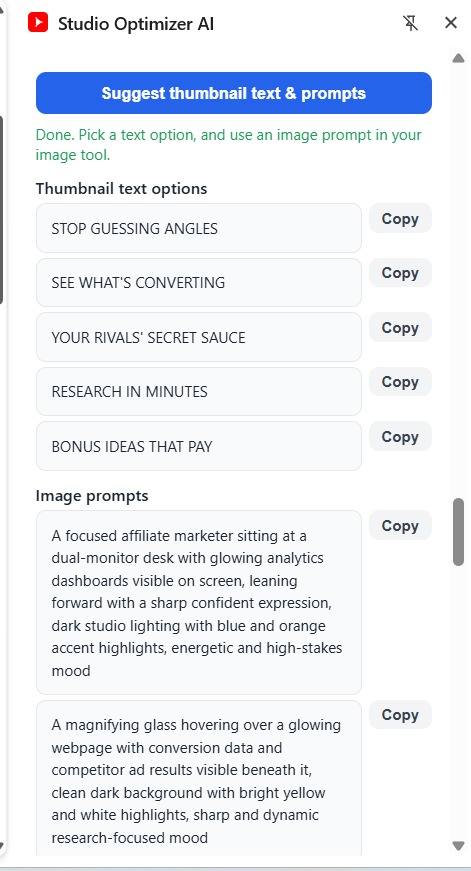
Thumbnail text and image prompts
Say it in 3 to 4 words. Get the words to put ON the thumbnail plus ready-to-use AI image prompts to generate the thumbnail itself.
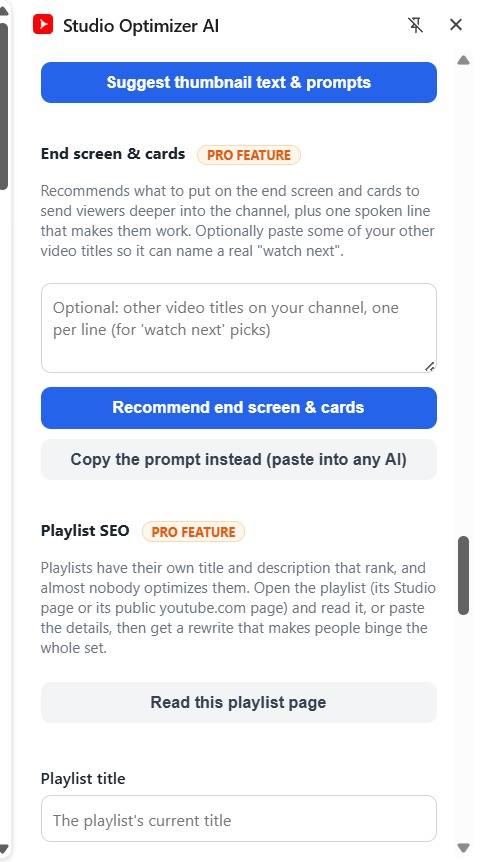
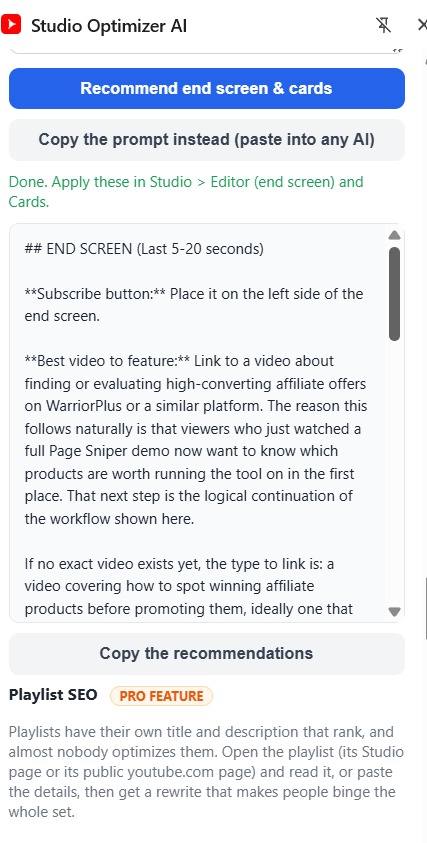
End screen and cards
Keep the session going. A plain-English plan for what to place on the end screen and cards, plus the one line to say out loud so viewers actually use it.
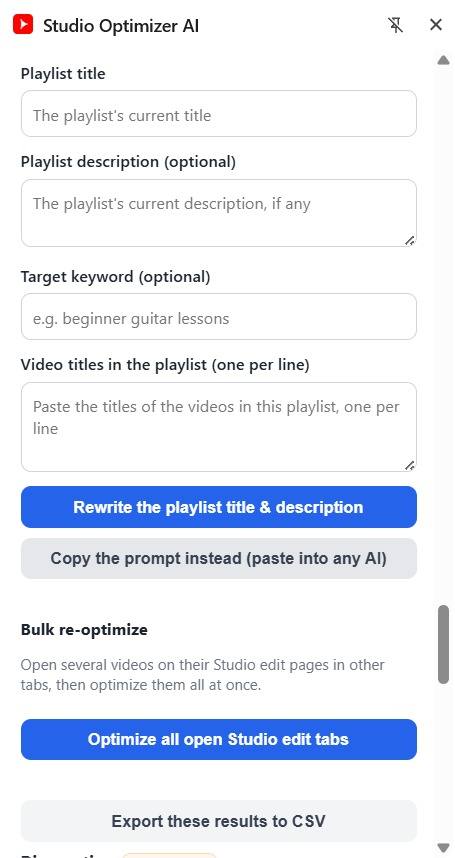
Playlist SEO
Make them binge. Open a playlist, click Read this playlist page, and Pro rewrites its title and description to make people binge the whole set.
Saved history and CSV export
Keep every run. Every optimization is saved so you can reload it, copy it, or export the lot to a spreadsheet.
Subtitles, the pinned-comment writer and more, in the same panel.Thumbnail text, end screen and cards, and playlist SEO.Thumbnail text options, plus ready-to-use AI image prompts.Exactly what to place on the end screen and cards, and the line to say out loud.
The pinned comment, written for you and sitting at the top of your comments.
Just shipped
We launched this week, and we are still building
We are updating Studio Optimizer AI in public. Here is what went in the last few days, all included:
Does your video actually say it? YouTube's AI now ranks on what you say and show on screen. This reads your transcript and checks whether your target keyword is really spoken, and where, then gives you a say-this and show-this plan.
Retention Doctor. Finds where your video most likely loses viewers and what to change in a re-edit.
Pre-publish check. A quick readiness list so YouTube's first test audience sees a finished video, not a half-built one.
Community post writer, with an AI image prompt for the promo graphic.
Shorts and clips finder that pulls the best moments straight from your transcript.
A Q&A block to help your video get cited in AI search, and a comment miner for your next video ideas.
Channel audit. Score your whole back catalogue in seconds, see the weakest videos first, and fix each one in a click. No subscription, no monthly fee.
All of it lives inside YouTube Studio and runs on your own AI key, so there is no monthly fee to us.
No hype
Built on the strategy, not the hype
Grounded, not invented
It rewrites only from your current title, description, topic and the transcript, and it uses real caption timings for chapters and subtitles. It does not make up claims, links or timestamps your video does not contain.
Your AI, your control
Bring your own key (OpenAI, Anthropic, Gemini or Grok). No subscription to us. With no key at all, it copies a ready prompt you paste into ChatGPT, Claude or Gemini.
Private
Your key is stored only on your device and used only from your browser.
You always approve
Fill is a convenience. You review every word and hit Save in Studio.
Built for channels like yours
Who it is for
Channel owners
With old videos that underperform and deserve a second chance.
Regular publishers
Creators publishing often who do not want to hand-write metadata, chapters and subtitles every time.
Channel managers
Anyone who manages other people's channels and needs to move fast without guessing.
One-time price • No subscription
Two ways to get it
Core is the rewriter. Pro is the whole growth toolkit. A Pro key already includes Core, so you only ever need one key.
Core • One-Time
$12.95
Read this Studio tab: pulls the current title and description into the side panel
Optimized title kept under YouTube's limit, plus 5 alternate titles
Full description: hook, summary, key points, call to action, hashtags
A set of tags
Copy + Fill into Studio on every field; you review and press Save
Bulk: optimize all open Studio edit tabs, one card per video
Title formula dropdown with 11 proven angles
YouTube-SEO score with Auto-fix, plus saved links and CTA placement
Chapters generated from the transcript, with real timings
Your own AI key (OpenAI, Anthropic, Gemini or Grok), or copy the ready prompt with no key at all
Core is $12.95, one time. Pro is on a dimesale: it starts at $27 and goes up by ten cents with every sale, up to $47. The number you see now is the lowest it will ever be.
This is not a countdown you have to believe. The price on the button is the price right now, and the next person will pay more than you did. Buy it early and you have paid less than everybody who comes after.
Side by side
In both tiers
Whichever you pick, the whole rewriter is yours. Every item below is in Core and Pro alike.
Read this Studio tab on any video's edit page, new upload or years old
A search-friendly title under YouTube's limit, 5 alternates, a full description and tags
Copy and Fill into Studio on every field, with you reviewing and pressing Save
Bulk across every open Studio edit tab, one card per video
The 11-angle title formula dropdown and the YouTube-SEO score with Auto-fix
Chapters generated from the transcript, with real timings
Bring your own AI key, or copy the ready prompt into ChatGPT, Claude or Gemini free; the key stays on your device
One-time price and the 30 day money-back guarantee
Where they differ
Core
Pro
Should you even rewrite this?analytics verdict plus the real search terms
no
yes
Search-intent optimizeauto-grabs the transcript, single and bulk
paste it yourself
yes
Subtitles / CC file.srt or .vtt with real timing
no
yes
Pinned comment writerhook, link and a question
no
yes
Thumbnail text and image prompts
no
yes
End screen and cardsa plain-English placement plan
no
yes
Playlist SEOrewrite a playlist's title and description
no
yes
Saved history and CSV export
no
yes
Price
$12.95one time
from $27rising to $47
Honesty and results
What it does, and what it will not promise
Studio Optimizer AI helps you write better titles, descriptions, tags, chapters, subtitles and packaging faster, and helps you decide which videos are worth the effort. It does not guarantee views, rankings or income. Results depend on your content, your niche and your audience. Better packaging gives a good video a better chance; it cannot fix a video nobody wants.
30Days
The 30 day money-back guarantee, on both tiers
Use it on your own channel. If you are not happy with your purchase within the first 30 days, contact me and I will refund you. No hoops, and you do not have to justify it to me.
Thirty days is long enough to work through a real batch of your back catalogue and judge the tool on what it actually does for you, not on a demo.
Straight answers
Questions people ask
Is Pro a separate download?
No. Core and Pro are the same extension. A Pro key just unlocks the extra features in place. Buy Core and upgrade later by pasting the Pro key into Add upgrade key. A Pro key already includes Core, so you only ever need one key.
Do I need an AI subscription?
You bring your own AI key (OpenAI, Anthropic, Gemini or Grok), so you only pay your provider's usage, usually pennies. With no key, the tool hands you a ready prompt to paste into any free chat.
Will it change my videos without me?
Never. It writes into the Studio fields as a convenience, but you review everything and click Save yourself.
Does it work on old videos?
Yes, that is where it shines. Re-optimizing your back catalogue is often the fastest win on a channel.
What if the transcript or analytics will not load?
Chapters and subtitles need a captioned video. For analytics, if a screen will not auto-read you can paste the numbers in. There is always a manual path.
Your videos are already made. Their packaging is the part you can fix today.
Give every video the title, description, chapters and packaging it should have had on day one, in the time it used to take to fix a single upload.
P.S. Core is $12.95, one time, and it now includes chapters. Pro is on a dimesale: it starts at $27 and goes up ten cents every time somebody buys it, up to $47, and it will not come back down, so the earlier you take it the less you pay. Either tier is covered by the 30 day money-back guarantee. Run it through a batch of your old videos, and if it did not earn its keep, tell me and I will refund you.
Privacy Policy
Last updated: 2026
This site and product are operated by Anthony Hayes (sole trader). We respect your privacy and are committed to protecting your personal information.
Information We Collect
When you purchase Studio Optimizer AI, we collect the information necessary to process your order and deliver your product access, including your name and email address. Payment processing is handled by our payment processor; we do not store your full payment card details.
How We Use Your Information
To deliver your download and licence key
To provide customer support
To send product updates and, where you have opted in, marketing emails (you can unsubscribe at any time)
Data Inside The Extension
Studio Optimizer AI runs in your own browser. The titles and descriptions it reads, the rewrites it produces, any saved history and any AI key you add are stored locally in your browser, not on our servers. If you add your own AI provider key, requests go directly from your browser to that provider under your own account. We do not see or store the content of your videos or your optimizations, and we do not sell your data to third parties.
Licence Checks
To confirm your licence is valid, the extension sends your licence key and an anonymous install identifier to our licence server. No video content is sent with that check.
Cookies
This site may use cookies for basic functionality and analytics. You can disable cookies in your browser settings.
Contact
For privacy questions, contact us at support@stephaniehayes.me.
Terms & Conditions
Last updated: 2026
Studio Optimizer AI is sold by Anthony Hayes (sole trader).
Licence
Your one-time purchase grants you a personal, non-transferable licence to use Studio Optimizer AI for your own channels and, where applicable, for channels you manage. Your licence key covers a limited number of browser installs. Upgrading to Pro extends the same licence key rather than issuing a separate product. You may not resell, redistribute or share your licence key.
Your Responsibilities
You are responsible for the accuracy and honesty of any titles, descriptions and tags you publish, including compliance with YouTube's policies.
You review and save all changes yourself; the tool fills editor fields but does not publish for you.
You are responsible for your own AI provider accounts, API keys and any associated usage costs.
Third-Party Services
Studio Optimizer AI works with pages you open in YouTube Studio and can integrate with third-party AI providers. We are not responsible for changes, outages, access restrictions or pricing decisions made by those services.
Refunds
30 days, no questions asked, on both tiers. If you are not happy with your purchase within the first 30 days, contact us and we will refund you. Contact support@stephaniehayes.me with your purchase details.
Limitation of Liability
The software is provided "as is." To the maximum extent permitted by law, we are not liable for indirect or consequential damages arising from your use of the tool.
Earnings Disclaimer
Studio Optimizer AI is a metadata and packaging tool designed to help you write titles, descriptions, tags, chapters and subtitles faster. It is not a business opportunity and does not guarantee any specific results.
We make no claims or guarantees regarding views, click-through rates, rankings, subscribers, revenue or income. Better packaging gives a good video a better chance; it cannot fix a video nobody wants to watch.
Your results will depend on many factors, including your content, your niche, your audience, your consistency and decisions made by the platforms you publish on, many of which are outside anyone's control. Some users may see no results at all.
Nothing on this page constitutes financial, legal, investment or professional advice.
Support
We're here to help. If you have questions before or after your purchase, reach us through any of the following:
Email: support@stephaniehayes.me
Support desk: anthonyhayes.ladesk.com
Please include your purchase email and transaction details so we can help you faster. We aim to respond to all tickets within one business day.